
Ask a question. Get the answer from your own numbers.
Ask a plain question. Get the answer from your own reports. Optional AI features, switched on after launch.
- Plain questions
- Answers from your reports
- Optional, on or off for each brand
Type a question in plain words, such as which dishes sold the most this week.
How it works
You ask
Type a question in plain words.
Zentaro Serve finds the report
It looks in your own reports for the answer.
You get the answer
A short answer, with a table and a chart.
Ask a follow-up
For example: and last week?
Optional, on or off for each brand
What it uses
Your own reports, only for the outlets you are allowed to see
You stay in control
Answers come from your own reports, only for the outlets you can see. You can switch Ask your data off for each brand.
Who decides
You. It answers; you act on it
- AI-assisted
- Optional
- Planned for launch, February 2027
- Who decides: You. It answers; you act on it
- Inputs: Your own reports, only for the outlets you are allowed to see
What it does.
Plain questions
Ask about sales, stock or payments the way you would ask a manager.
Answers from your reports
The answer comes from your own reports, not from guesswork.
Only what you can see
Each person gets answers only for the outlets they are allowed to see.
Safe questions only
AI picks from a set of ready, safe report queries. It does not read your database freely.
Worked example (sample data).
One made-up restaurant, to show how Ask your data works from start to finish.
Example, not real data
A sample outlet manager opens Ask your data on a Monday.
- Input
- She types: "Which dishes sold the most this week?"
- Output
- Zentaro Serve finds the matching report and shows a short answer with a table of dishes ranked by quantity sold, and a chart. Sample top rows: Veg Biryani, Paneer Tikka, Masala Dosa.
- What you check or change
- She compares the table with the sales report it came from, then asks a follow-up: "And last week?"
- If it is wrong
- If the answer is not what she expected, she opens the report and checks the figure there. She can ask again in other words. The answer comes from a set of ready, safe report queries, not from a free read of the database.
Sample questions.
The kind of plain question you can type. These are examples, not real data.
Sample data, not real
- Which dishes sold the most this week?
- And last week?
- How much did we sell yesterday?
- How much stock do we have of paneer?
- How much did we take by UPI today?
Product screens
The screens you and your team will use for this.
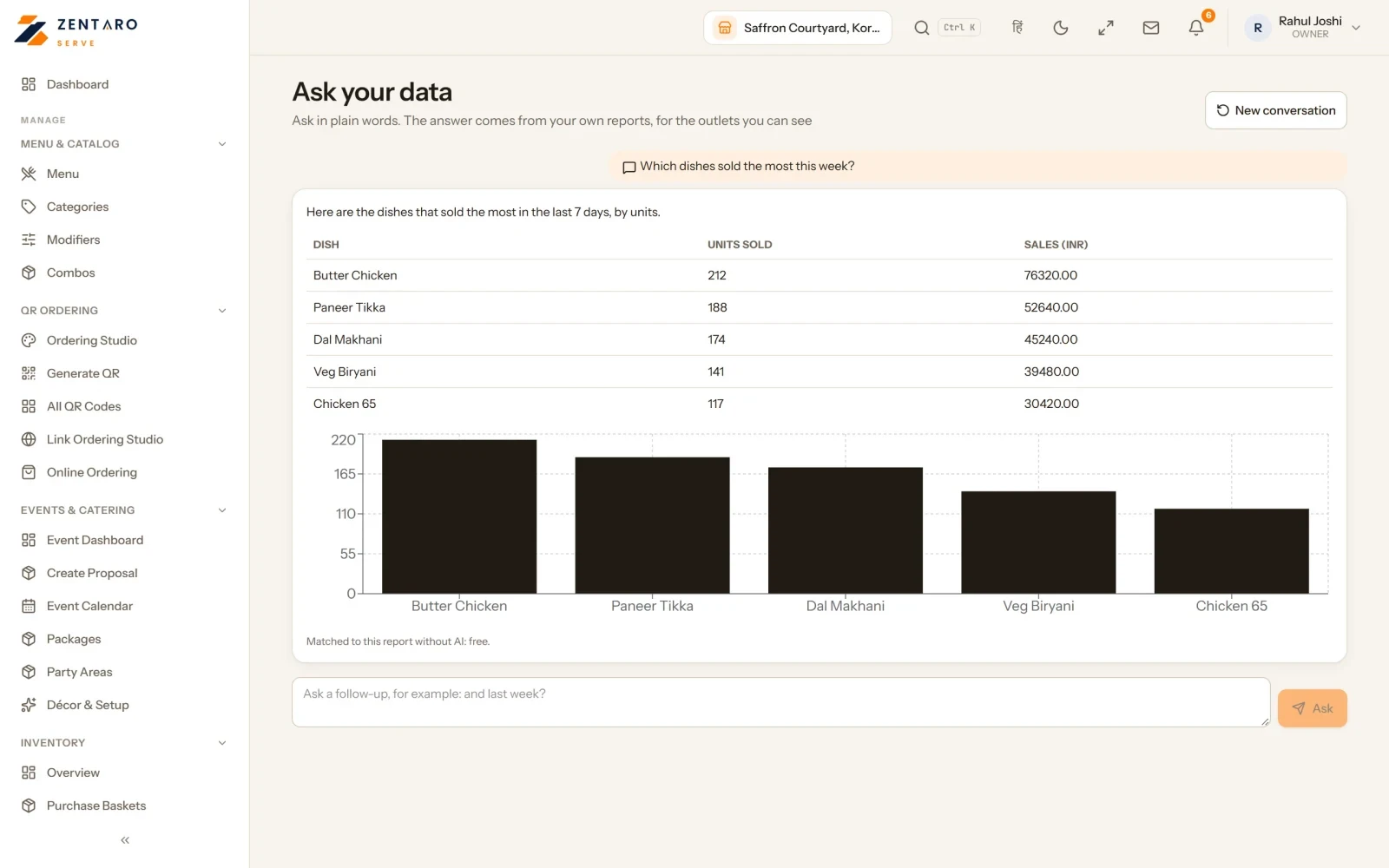
Example screen with sample data
Who it helps.
Check how the business is doing without opening five reports.
Get answers for their own outlets only.
You stay in control. Answers come from your own reports, only for the outlets you can see. You can switch Ask your data off for each brand.
Good to know
- This AI feature is optional. You switch it on or off for each brand.
- Each AI task uses credits from your balance.
Common questions.
What can I ask?
Plain questions about your sales, stock or payments, such as which dishes sold the most this week.
Where does the answer come from?
From your own reports, only for the outlets you are allowed to see.
Does every question use credits?
Asking is an AI task, so it takes credits from your balance, like other AI features. Your credit page shows every use.
More AI in Zentaro Serve.
Part of AI tools for restaurants See also Daily briefing. Leak watchdog explanations. Menu import. Menu insights and wording.
Tell us about your restaurant.
Zentaro Serve launches in February 2027. Tell us what you run today and we will get in touch.
Last updated: