
Less typing of orders and payments.
Orders, payment proofs and payout statements read into fields, so your team types less. Optional AI features, switched on after launch.
- Orders from a photo, email or outside channel
- Payment proofs
- Optional, on or off for each brand
Orders that arrive by email or from outside channels, payment proofs and payout statements can be read by AI.
How it works
An order or a proof arrives
By email, from an outside channel, or as a file.
AI reads it
It picks out the details.
You check it
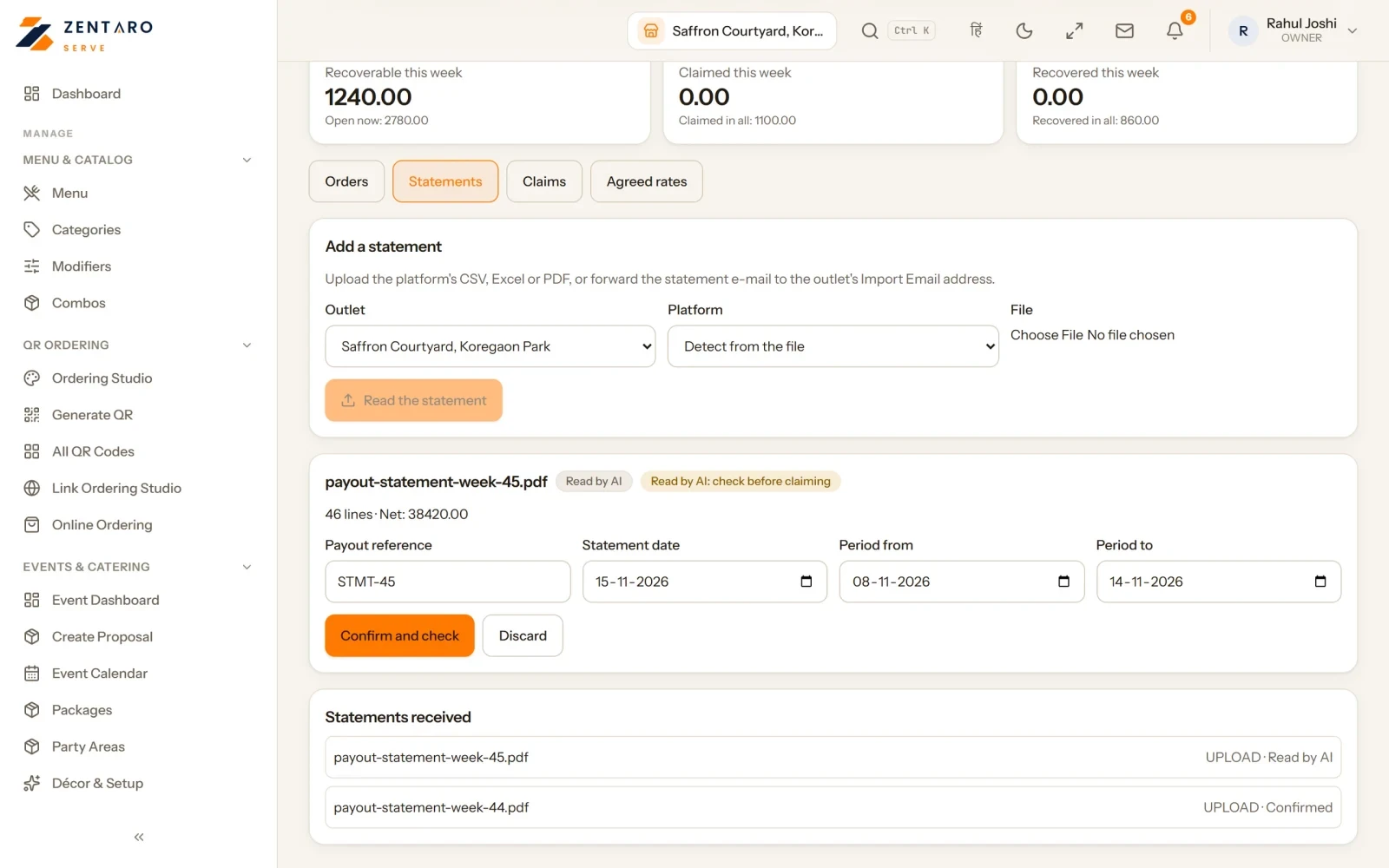
A statement read by AI is marked for checking. You confirm it before you claim.
Optional, on or off for each brand
What it uses
An order slip photo, an email or an outside order. The payment screen a rider photographs. A payout statement PDF
You stay in control
A statement read by AI is marked "check before claiming". You confirm the reference and dates first.
Who decides
You review before the order is created. You confirm a statement before you claim
- AI-assisted
- Optional
- Planned for launch, February 2027
- Who decides: You review before the order is created. You confirm a statement before you claim
- Inputs: An order slip photo, an email or an outside order. The payment screen a rider photographs. A payout statement PDF
What it does.
Orders from a photo, email or outside channel
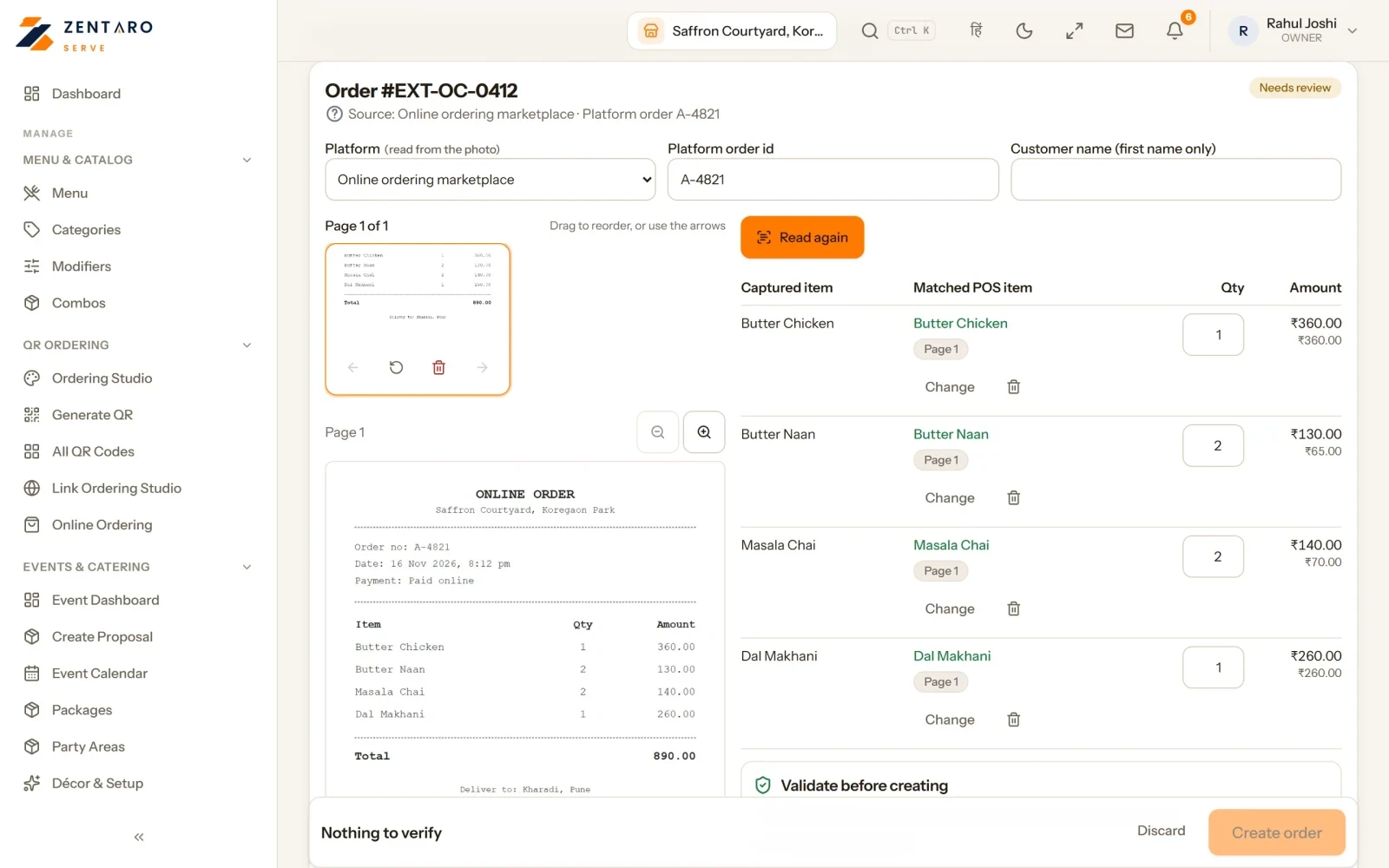
AI reads an order slip photo, an email or an outside order into lines, matched to your own menu items. You review it before the order is created.
Payment proofs
When a rider takes UPI at the door, AI reads the payment screen the rider photographs, so nobody types it.
Payout statements
AI can read a payout statement PDF. This is an optional paid add-on with credits, and a person confirms each one before you claim. CSV and Excel statements need no AI.
Worked example (sample data).
One made-up restaurant, to show how Order and payment reading works from start to finish.
Example, not real data
A sample restaurant gets a catering order by email.
- Input
- The email lists three dishes with quantities.
- Output
- AI reads the email into order lines and matches each to the restaurant's own menu items.
- What you check or change
- A staff member reviews the lines and fixes one quantity before the order is created.
- If it is wrong
- If a line is matched to the wrong dish, the staff member corrects it in the review. No order exists until the lines are reviewed. A payout statement read by AI is marked for checking, and you confirm the reference and dates before you claim.
Product screens
The screens you and your team will use for this.
Example screens with sample data
Who it helps.
Spend less time typing proofs and statements.
Bring orders from other places into one till.
You stay in control. A statement read by AI is marked "check before claiming". You confirm the reference and dates first.
Good to know
- This AI feature is optional. You switch it on or off for each brand.
- Each AI task uses credits from your balance.
Common questions.
What can AI read?
Orders that arrive by email or from outside channels, payment proofs and payout statements.
Where does a read order go?
You review the lines first. Then it becomes an order in Zentaro Serve, next to your other orders.
Do I have to check a payout statement read by AI?
Yes. It is marked for checking. You confirm it before you make a claim.
Part of AI tools for restaurants See also Ask your data. Daily briefing. Leak watchdog explanations. Menu import.
Tell us about your restaurant.
Zentaro Serve launches in February 2027. Tell us what you run today and we will get in touch.
Last updated: