
AI only where you want it.
Switch each AI feature on or off for each brand, and pay for AI with credits. Optional AI features, switched on after launch.
- On or off for each brand
- Credit for each level
- Optional, on or off for each brand
Every AI feature in Zentaro Serve is optional.
How it works
You pick the features
Switch on only the ones you want.
Credits are used
Each AI task takes credits from your balance.
Switch off any time
New AI work stops straight away.
Optional, on or off for each brand
What it uses
Your own choices: which features are on, and your credit balance
You stay in control
AI is never switched on behind your back. You choose each feature, for each brand.
Who decides
You. AI is never switched on behind your back
- AI-assisted
- Optional
- Planned for launch, February 2027
- Who decides: You. AI is never switched on behind your back
- Inputs: Your own choices: which features are on, and your credit balance
What it does.
On or off for each brand
Each AI feature has its own switch, set at brand level.
Credit for each level
AI credit sits in wallets for the business, each brand and each outlet. You see what is left and every use, and can buy more.
Off means off
Switching a feature off stops new AI work. What it made before is kept.
Where AI runs
Ask us where AI runs for your country.
Worked example (sample data).
One made-up restaurant, to show how AI settings and credits works from start to finish.
Example, not real data
A sample owner has two brands and wants AI for only one.
- Input
- She opens the AI settings for Brand A and switches on the daily briefing. She leaves Brand B alone.
- Output
- The briefing now runs for Brand A. Each AI task takes credits from the balance, and she can see what is left and every use.
- What you check or change
- She looks at the credit page after a week to see what was used, and buys more credits if she wants to.
- If it is wrong
- If she does not want a feature after all, she switches it off. New AI work stops straight away, and what it made before is kept.
Product screens
The screens you and your team will use for this.
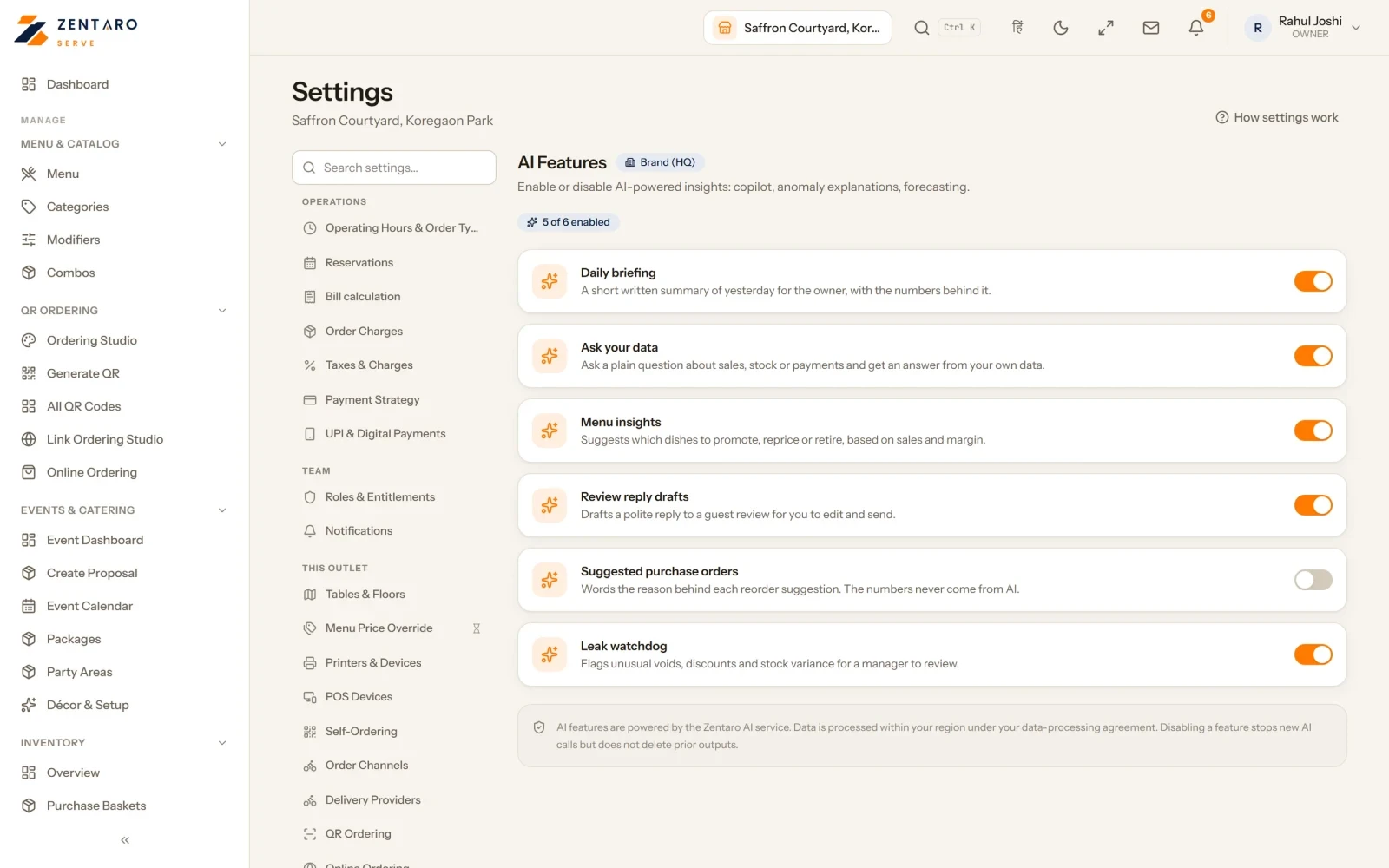
Example screen with sample data
Who it helps.
Decide which AI helps and what it costs you.
Set AI once for the whole brand.
You stay in control. AI is never switched on behind your back. You choose each feature, for each brand.
Good to know
- Each AI task uses credits from your balance.
Common questions.
Do I have to use AI?
No. Every AI feature is optional. You switch each one on for each brand.
How do I pay for AI?
AI uses credits. Each task takes credits from your balance. You can buy more credits.
What happens when I switch a feature off?
New AI work stops. What it made before is kept.
Where is my data processed for AI?
Ask us where AI runs for your country.
More AI in Zentaro Serve.
Part of AI tools for restaurants See also Ask your data. Daily briefing. Leak watchdog explanations. Menu import.
Tell us about your restaurant.
Zentaro Serve launches in February 2027. Tell us what you run today and we will get in touch.
Last updated: