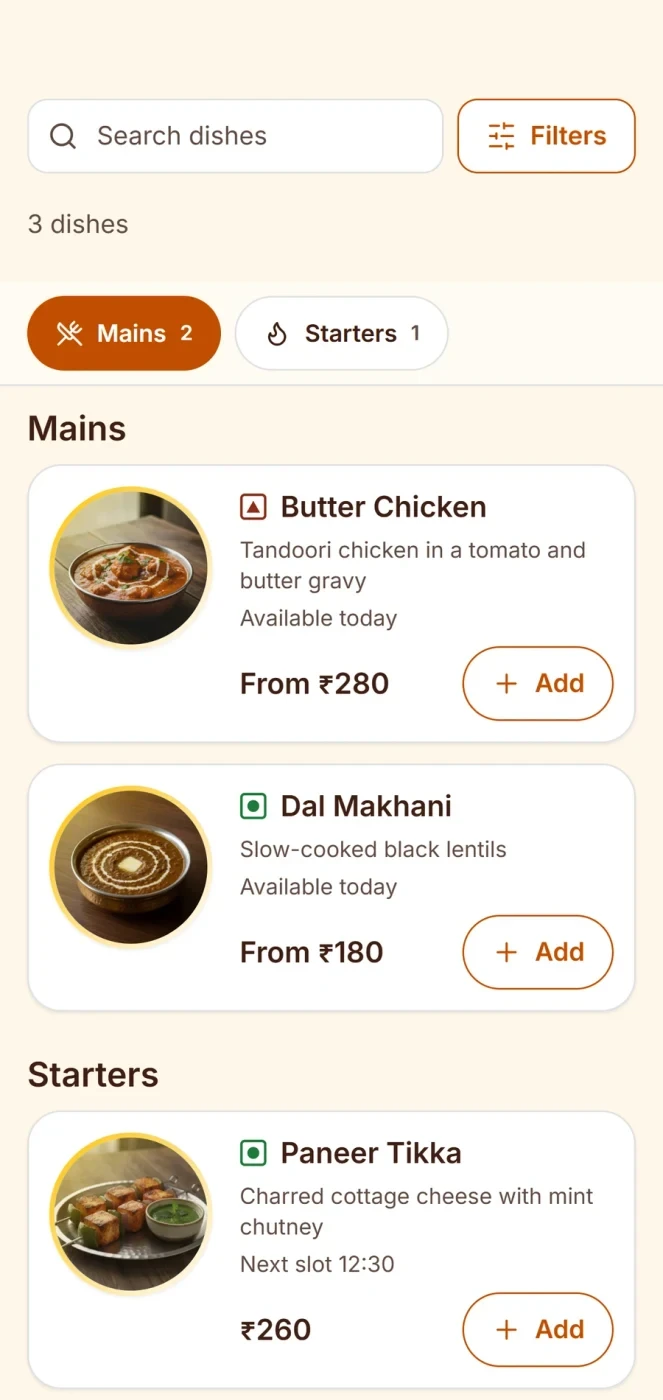
Online ordering for restaurants works best on your own channel. Zentaro Serve gives each outlet its own ordering link. Guests order takeaway or delivery from it. The order lands in your POS like any other order, goes to the kitchen, and adds the guest to your own list. Orders from your restaurant website arrive in your Zentaro Serve console. The Zovi web app is launching in February 2027.
One ordering link for each outlet
Orders go straight to your POS and kitchen
Every order builds your own guest history
Payments settle into your restaurant's linked account
Get one ordering link for each outlet, and a QR studio to print it.
2
Share it on a WhatsApp status, an Instagram bio or a sticker on the packaging.
3
The guest orders takeaway or delivery from the link.
4
The order lands in your POS. Your team accepts it, and the kitchen gets the ticket.
Launching February 2027
At launch in February 2027, each outlet gets an online ordering link. Orders flow into the POS and kitchen like any other order.
Zovi is the guest ordering web app from Zentaro, Zentaro Serve is the restaurant POS and operations system, and orders from your Zovi website arrive in Zentaro Serve.
Is the ordering link the Zovi store? Yes. The link for an outlet opens your Zovi page, at your-name.zovi.food. Zovi is what the guest sees. Zentaro Serve holds the menu, prices and the order itself. You do not need a separate website tool to take orders.
Plus a QR studio to print it on standees, stickers and bills.
Takeaway and delivery, no app to install
Guests order from your menu, with your prices and photos. No login wall.
Direct to your kitchen
Orders placed through your link go straight into your POS and kitchen workflow. No second tablet and no re-typing.
Your guests, your relationships
Every order builds your own guest history, helping you bring customers back.
Payments to your account
UPI and card payments settle into your restaurant's linked account.
One menu, always in sync
Mark a dish as sold out once, and it becomes unavailable across your connected ordering channels.
Your channels
Orders from your own ordering link stay yours.
Direct to your kitchen. Orders placed through your link go straight into your POS and kitchen workflow.
Payments to your account. UPI and card payments settle into your restaurant's linked account.
Your guests, your relationships. Every order builds your own guest history, helping you bring customers back.
One menu, always in sync. Mark a dish as sold out once, and it becomes unavailable across your connected ordering channels.
Your ordering link
Your ordering page, one link, shared anywhere.
Share it on a WhatsApp status, in your Instagram bio or on a sticker on the packaging.
You share your outlet's link. Label: once.
One shareable ordering link per outlet, plus a QR studio to print it on standees, stickers and bills.
Guest orders takeaway or delivery. Label: your guest.
From anywhere — home, office, the bus. Your menu, your prices, your photos. No app install, no login wall.
Order lands in your POS. Label: automated.
No second tablet, no re-typing. It queues with every other order and fires to the kitchen on acceptance.
The guest joins YOUR history. Label: automated.
Name, orders, frequency — in your CRM. The Friday regular is your data, not a platform's.
Payments and charges
How a guest pays, and what you can charge
The guest sees the full price before they pay. Here is the flow and what you can set.
The guest picks dishes on your link. Label: your guest.
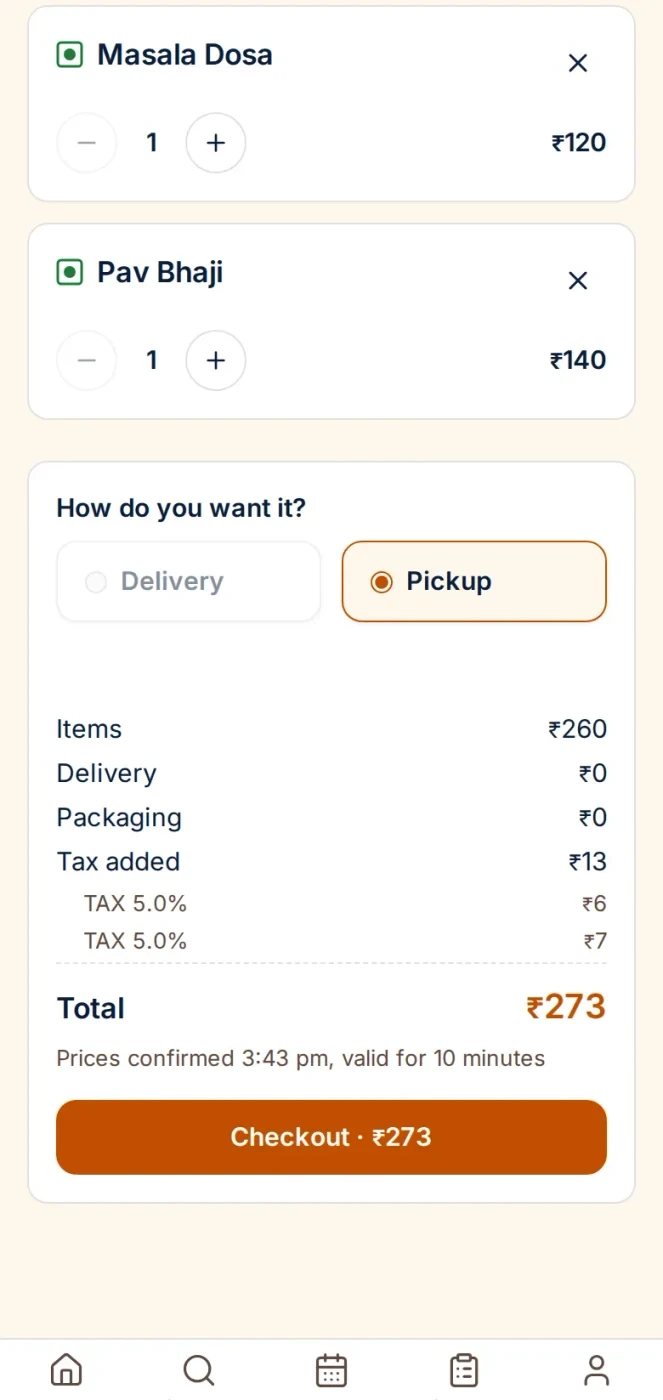
They choose takeaway or delivery. The price breakdown shows the food, any charges and the tax before they pay.
The guest pays by UPI or card, or later. Label: your guest.
You choose for each outlet whether the guest can pay online at checkout, or pay at pickup or on delivery. Online payment shows only when your restaurant's own payment account is set up.
The money settles into your account. Label: automated.
Payments go through your own Razorpay account and settle into your restaurant's linked account, never through us.
The order lands in your POS and kitchen. Label: automated.
It queues with every other order. Your team accepts it, and the kitchen gets the ticket.
Charges you can set
A delivery charge. One flat charge, or a charge for each delivery zone you set by pincode. A zone can be free above an order value.
A packaging charge. For takeaway, delivery or both, as a set amount, for each item or as a share of the food.
A small-order fee. A charge when the food total is below a value you set.
Other charges of your own. Add a charge with its own name. You can limit it to certain days and hours, or waive it above an order value.
Tax on charges. GST on each charge follows the setting on your tax page, and it appears on the bill.
Payment fees. Fees for taking a payment follow your own Razorpay account. They are between you and Razorpay.
The Zovi web app, launching in February 2027, is planned to let guests book in advance too.
by Zentaro
Zentaro Serve and Zovi.
Browse. Order. Enjoy.
Zovi is the guest ordering web app from Zentaro, Zentaro Serve is the restaurant POS and operations system, and orders from your Zovi website arrive in Zentaro Serve. Launching in February 2027, it lets guests browse the menu of a seller, place orders and follow them. It is for every food business: restaurants, cafes, cloud kitchens, home chefs and tiffin services.
Zovi: the guest orders on the web app. Zentaro Serve: the order arrives, like any other order. Your restaurant: the till and the kitchen screen run it.
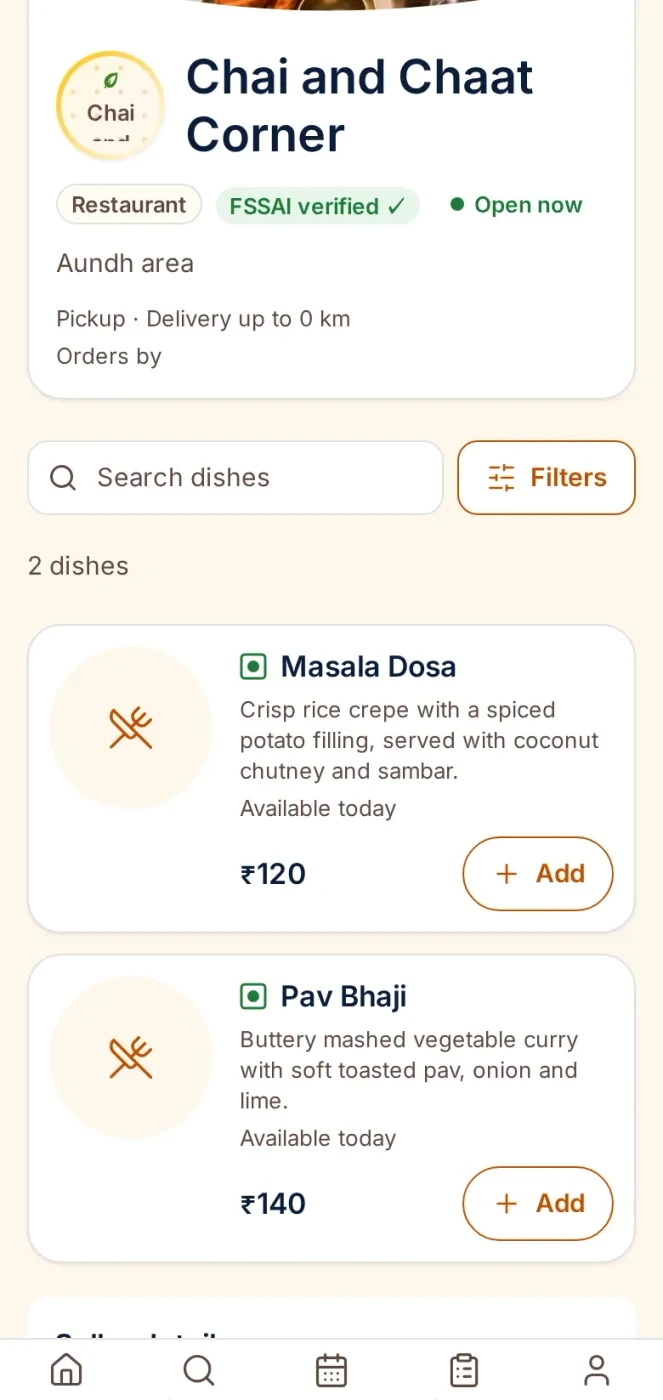
Open a seller's page and browse the menu
Review the order and charges
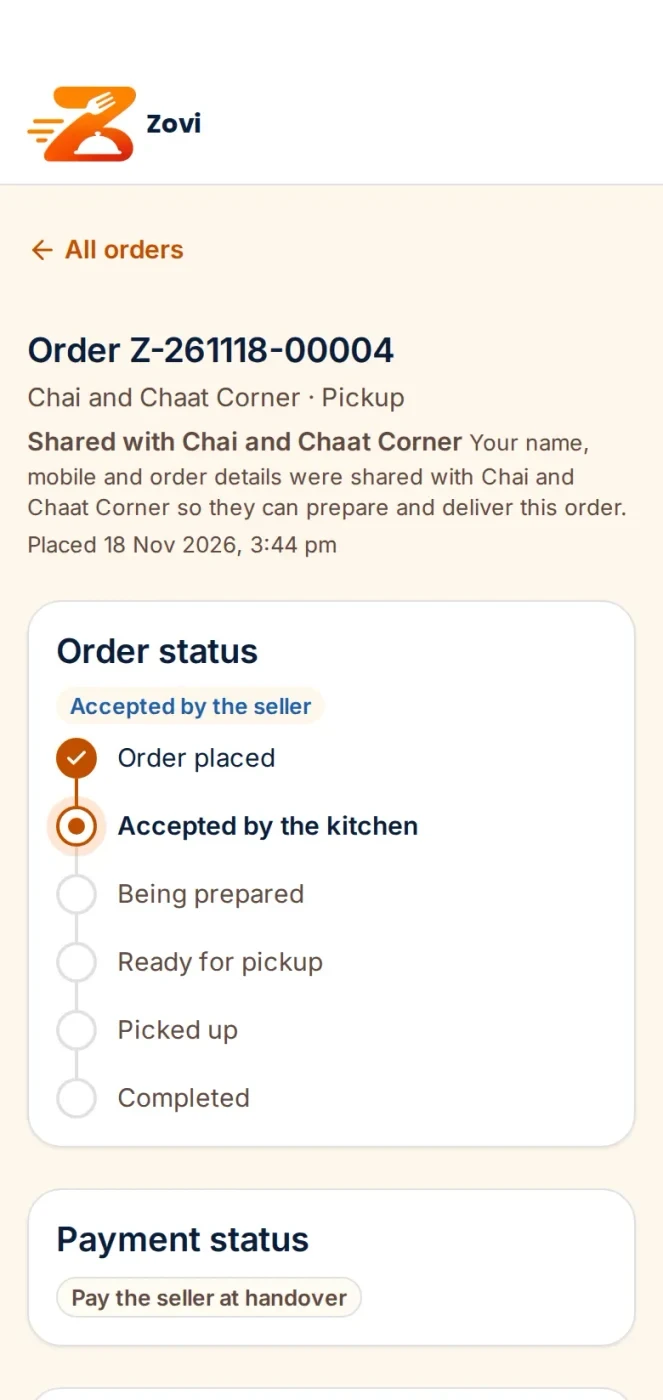
Follow the order step by step
Example screens with sample data
Browse, order and follow
Guests browse the menu, order and follow their order, all in one web app.
One till, one kitchen screen
Orders from Zovi will reach the same till and kitchen screen as your other channels.
Money to your account
When a guest pays through the Zentaro Serve pay link, the money goes to your own payment account.
Your menu, your guests
You keep your own menu. You keep your own customers.
Delivery with a rider app
Planned for launch
The rider app is planned for launch and is not in the app stores yet. Riders will see their delivery jobs, follow the route to the guest and confirm each delivery with a code.
Good to know.
Your team accepts each order before the kitchen gets it.
Zovi is launching in February 2027. Nothing about it is live today.
More for delivery, online links, phone orders and later orders
Guests follow their order
The guest gets a link that shows the status of the order.
For delivery, a live map shows once the rider has picked the order up.
When the order ends, the rider's location is no longer shared.
Phone orders at the till
Pick one of the guest's saved addresses, or add a new one. The default address comes first.
A search box helps when the list is long.
The same address is never saved twice.
Orders for later
Set the slot length, the minimum notice and how many days ahead a guest can order.
Set when the kitchen starts, how many orders fit in a slot and the last slot before you close.
Set it for each order type, for the brand, a region or one outlet. The most specific setting wins.
If nothing is set, the outlet takes no later orders.
Share an ordering link
Turn on online ordering to get a link and a QR code. Share it on social media or in messages.
Choose delivery, takeaway or both. Set the delivery radius, the lowest order, the delivery charge and the ordering hours.
Choose how guests pay: online first, on delivery, or both.
You design how the page looks in the ordering studio.
Your look on every guest page
Set your brand colour and logo once. They carry to your ordering pages and receipts.
You can also set the receipt header and footer.
A font style and a top picture set the feel of your table menu.
Pair your own riders' phones
Make a pairing QR code. The rider scans it in the rider app.
The code works once and runs out in a few minutes.
See the connected phones, and disconnect one when a rider leaves.
Zentaro Serve does not supply riders. These are your own.
Product screens
The screens you and your team will use for this.
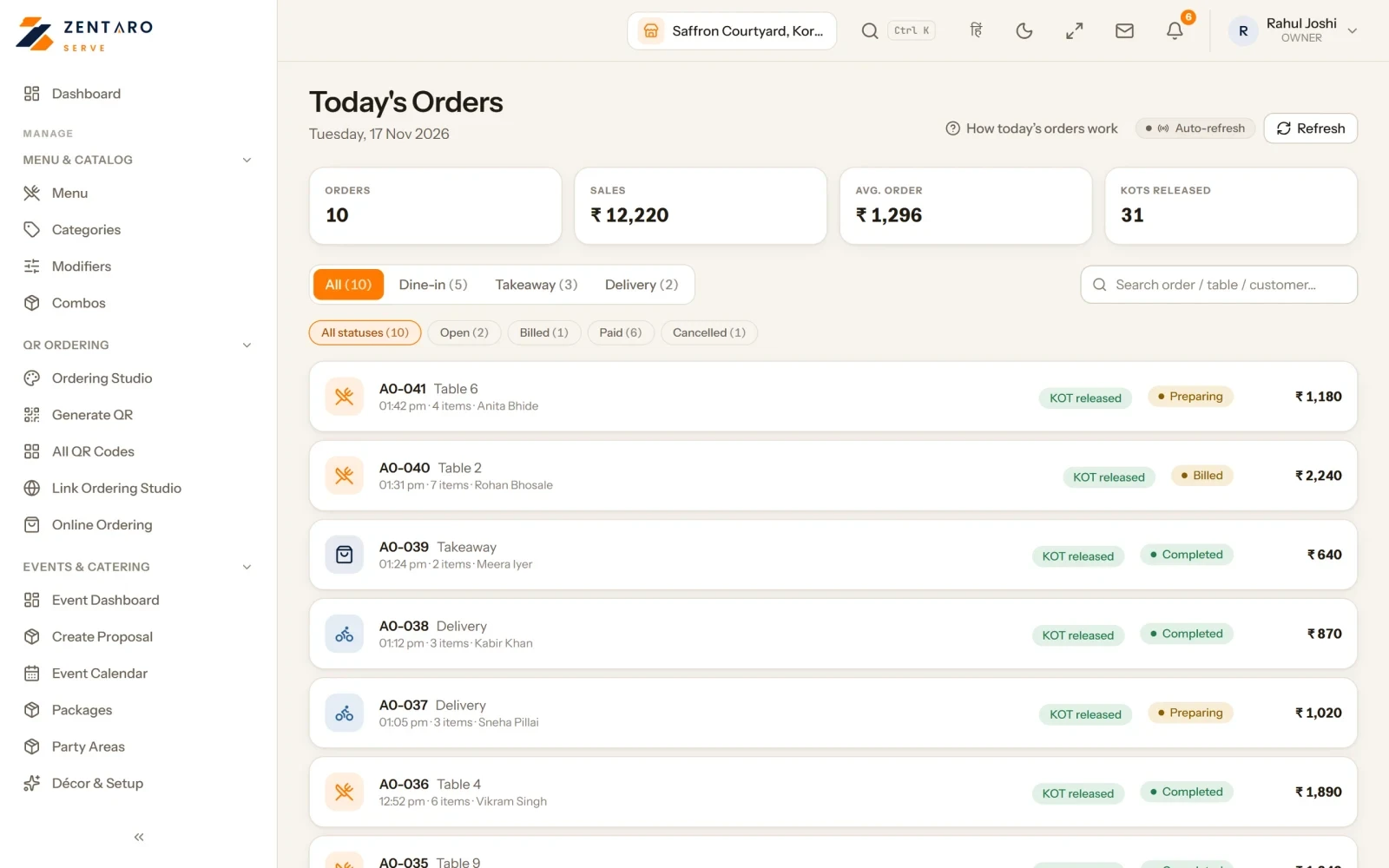
Dine-in, takeaway and delivery orders today
Your ordering page
Dine-in, takeaway and delivery orders today
Example screens with sample data
The problem you know
Why orders leave through other people's apps
Orders come by phone and WhatsApp, written on slips and typed in later.
Outside apps keep the guest list. Your regulars become somebody else's data.
A dish shows as available online after the kitchen has run out.
How does an ordering link bring direct ordering?
Get one ordering link for each outlet, and a QR studio to print it.
Share it on a WhatsApp status, an Instagram bio or a sticker on the packaging.
The guest orders takeaway or delivery from the link.
The order lands in your POS. Your team accepts it, and the kitchen gets the ticket.
The guest follows their order from a status link.
What online ordering for restaurants includes
Scheduled orders, for a guest who orders for later.
Delivery details, an address book and an inbox for pending orders.
Orders from your own ordering link for counter outlets.
Channels on or off for each outlet.
What it is not
Zentaro Serve does not supply riders. Delivery providers can be connected where set up.
Talk to us and we will set up your first link.Talk to us
Common questions.
Do I need Zovi to take online orders with Zentaro Serve?
For the ordering link, yes: the guest side is Zovi. The link for an outlet opens your Zovi page, at your-name.zovi.food, and the order arrives in Zentaro Serve and lands in your POS and kitchen. Orders taken on the till need no Zovi. Zentaro Serve launches in February 2027.
What ways can a guest order?
By your shareable ordering link, for takeaway and delivery. Ordering at the table has its own page, table QR ordering.
Where do orders from my own channels go?
Orders from your ordering link come straight to your POS and go to the kitchen.
Can guests pay online?
Yes. A guest can pay by UPI or card at checkout, or pay at pickup or on delivery, as you set for each outlet. Online payment shows when your restaurant has its own Razorpay account set up, and the money settles into your account.
Can guests book in advance?
Your team can book a table, or a party or banquet, with an advance. The Zovi web app, launching in February 2027, is planned to let guests book in advance too.
How do I start online ordering for my restaurant?
Switch on online ordering for your outlet, share your ordering link and print the QR. Orders then land in your POS like any other.
What is an ordering link?
It is your own page for one outlet. A guest opens it, picks dishes and orders takeaway or delivery. You share it anywhere.
Do I pay commission on direct ordering?
Razorpay charges its own fees. Ask us what applies to orders on your own link when you talk to us.
Put your link up tonight.
Get your ordering link, share it on your WhatsApp status and watch your first order land in your POS.

 by Zentaro