Menu & pricing Restaurant menu management: one menu, every screen Restaurant menu management means building your dishes, extras and prices once and sending them to every screen. In Zentaro Serve, modifiers and combos live in one menu. Menu pricing can differ by outlet, region or channel. You can plan changes in a draft before they go live.
A menu with a clear shape Modifiers with prices Combos are one line Price books for each outlet Without it
A dish is edited in one place and stays wrong in three others. Modifiers are typed as notes, so "no onion" never reaches the kitchen as data. Anyone with a till can discount below what the dish costs to make.
What it does. A menu with a clear shape Categories keep the till and the guest menu easy to use. It does not become one long list.
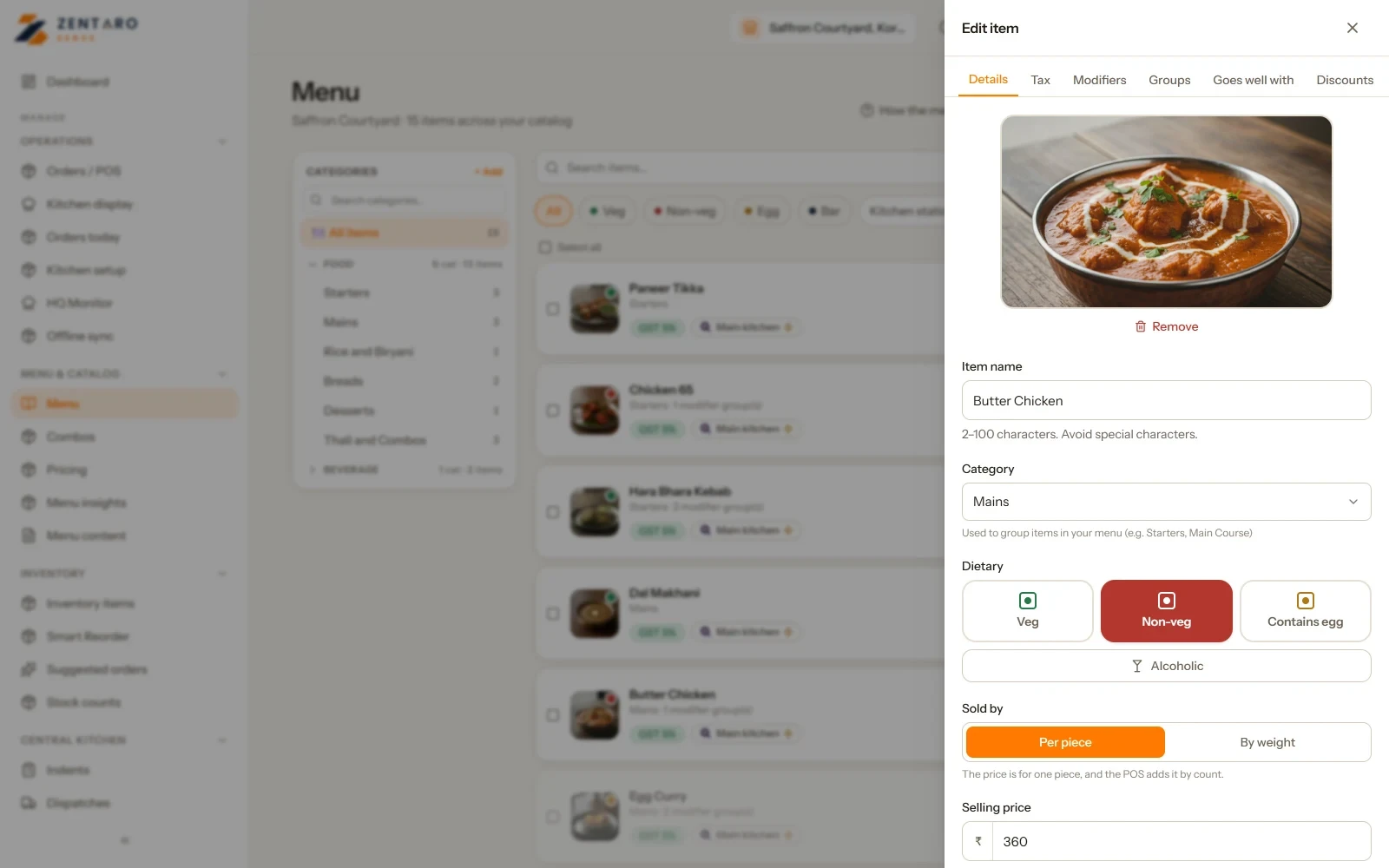
Modifiers with prices Extras are set up and priced. Extra cheese reaches the kitchen and the bill as the same thing.
A meal deal is one line for the guest. The kitchen and stock see each part.
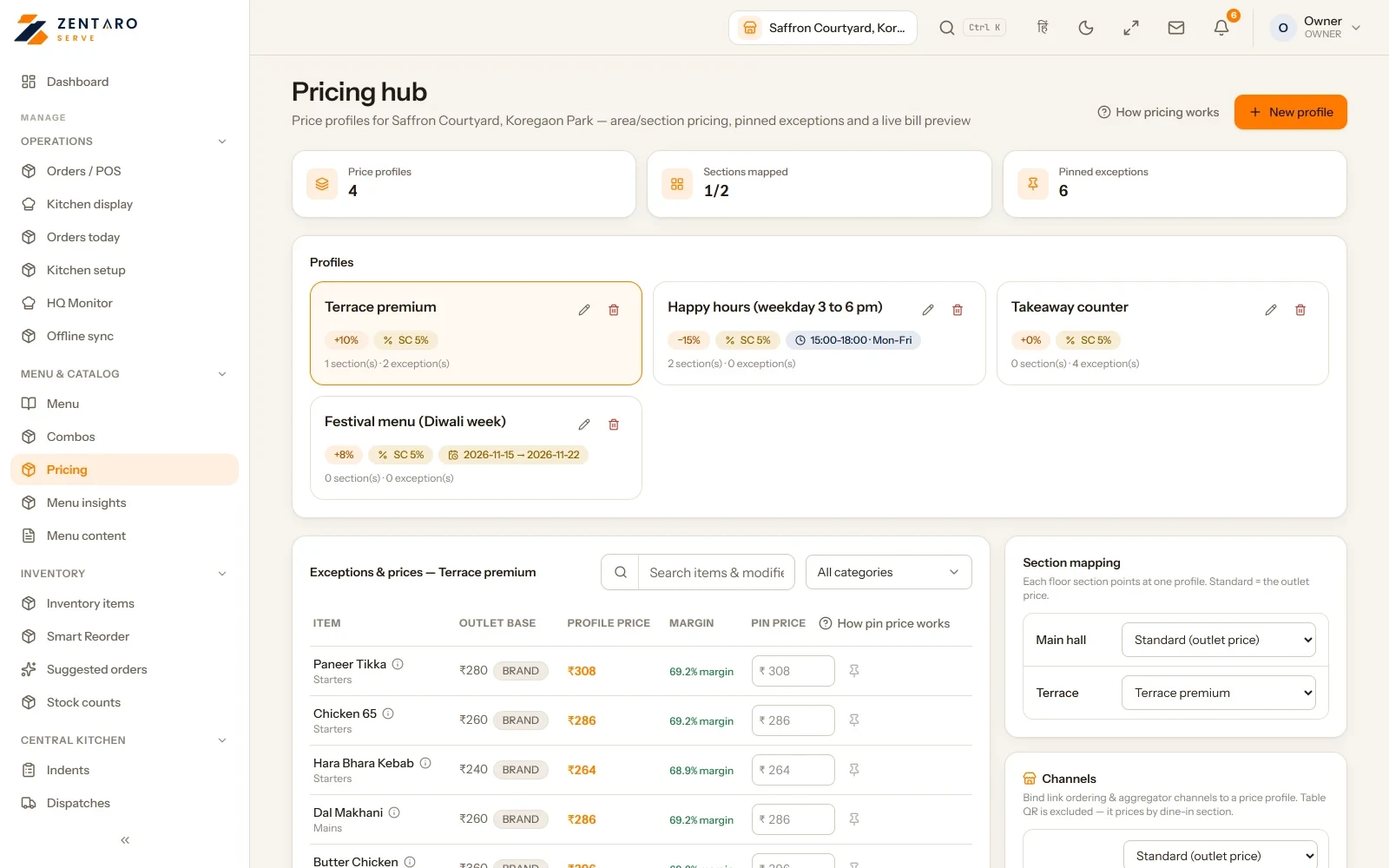
Price books for each outlet Prices live in books by outlet, region and channel. A change is deliberate and recorded.
A lowest price nobody sells below Changing a selling price needs permission. Staff cannot sell below the lowest price you set.
Guests never order what is off A dish that is off today is off everywhere guests can see. Nothing is ordered that the kitchen cannot make.
Prices that fit each area and each hour. One restaurant can have different prices by area for the same dish. Think of an AC hall, a garden, a rooftop or takeaway.
One change reaches every device Change a price in the admin app and it reaches every device that is online within minutes. A device that is offline gets it when it reconnects.
Special prices set in advance Schedule special prices in advance for festivals or rush hours, with a start and end time, and they switch on and off by themselves.
A rush-hour price is set in advance. It shows on the menu, the QR menu and the bill, so the guest always sees the price they pay.
How it works. Build it once for the brandonce Categories, items, modifiers and combos live in one menu.
Price it per outlet and channelautomated A price book applies where it should; overrides are deliberate.
It appears everywhere at onceautomated Till, kitchen screen, QR page and delivery link.
86 it and it goes everywhereautomated Sold out is sold out on every surface a guest can reach.
Product screens The screens you and your team will use for this.
Example screens with sample data
The problem you know
Why restaurant menus drift out of date A price is changed in one place and stays old on the QR menu. "No onion" is typed as a note and the kitchen misses it. A festival menu means reprinting and retyping everywhere. How does menu management work for modifiers, combos and menu pricing? Build categories, dishes, modifiers and combos once for the brand. Change a dish or a price. Every change is kept on record. Set price lists for outlets, regions or channels where prices differ. Edit prices in bulk, or import and export a sheet. Mark a dish off and it stops selling everywhere guests can order. What restaurant menu management includes Bulk price edit, import and export. Price profiles and tiers, price lists by region, and overrides for one outlet. Dishes that "go well with" others, and packages on the menu. Weight items for the counter. What it is not
Zentaro Serve does not make your photos or write your dish descriptions. You add them. Plans differ in which menu tools they include. Who manages the menu in your restaurant Who it is for
Owner and chef: the menu once. Manager: availability. Head office: price lists. Talk to us and send us your menu sheet. Talk to us
Undo, change many at once, import and dated prices Undo a menu change Every item that is added, edited or deleted is listed with who did it and when. Revert one change, or a whole session of changes. The undo is written to the list too, so the trail stays clean. Change many items at once Pick many items and make them active, mark them unavailable, move them or delete them. You can also set a tax rule for all of them. You say why, and the reason is kept. At an outlet, you can raise or lower prices by 5 percent for the whole menu. It needs the price permission. Bring your menu in from a spreadsheet Upload an Excel or CSV file and choose which column holds each field. The name and the price are needed. It is free and uses no AI. You can also start from a photo or a file. Nothing is added until you approve it. Prices for a date window A price profile can run from a date to a date, such as a festival week. Outside the window, the outlet price applies. A profile can raise prices by a percent or a fixed amount, for all items or one category. You can pin one item to an exact price inside the profile.
Common questions. Can prices differ by outlet? Yes. You can set price books for each outlet and channel.
Can I stop staff selling below a price? Yes. You can set a floor below which staff cannot sell.
Are modifiers and combos supported? Yes. One brand menu holds modifiers and combos.
How do I manage a restaurant menu across several outlets? Build one menu for the brand. Then set price lists where an outlet, a region or a channel needs a different price.
What is a modifier in a restaurant menu? A modifier is a choice on a dish, such as size, spice or an extra. It is priced and it reaches the kitchen ticket and the bill.
Can I set different prices for dine-in and delivery? Yes. Price lists can differ by channel, so dine-in and delivery can have different prices.
Can I stop staff selling below a set price? Yes. You can set a lowest price. Staff cannot sell below it.
Can I import my menu from a spreadsheet? Yes. Import and export are built, so you can bring your menu in from a sheet.
Tell us about your restaurant. Zentaro Serve launches in 2027. Tell us what you run today and we will get in touch.
Last updated: 16 November 2026