GST billing software for restaurants puts the right tax on every bill and gives your accountant clean data. Zentaro Serve has GST setup in Settings > Taxes, a GST invoice on each bill, an optional service line and rounding rules, and a GSTR export. Not registered yet? Turn GST off for your brand.
Invoice numbers have gaps nobody can explain at filing time.
A reprint shows today's GSTIN on a bill issued under the old one.
Returns are assembled by re-keying a month of bills into a spreadsheet.
What it does.
The right tax for each bill
CGST and SGST, or IGST, follow the place of supply. They do not depend on who set up the item.
A bill is frozen as issued
A reprint matches what the guest was given, with the GSTIN it was issued under. A later change never rewrites history.
Supplier-side e-invoice and e-way bill data
Zentaro Serve prepares the e-invoice and e-way bill data for supplier invoices and stock transfers. You record the IRN and the e-way bill number you get from the portal. E-invoices for your own sales (IRN) are planned.
GSTR-2B matching
Claim only input credit that matches. A register backs up the claim.
Export for your accountant
Give your accountant a GSTR export. Nothing is filed for you.
Not registered? Switch it off
Turn GST off for a brand and the tax screens go away. Bills print clean, with no tax lines.
How it works.
The bill is raisedautomated
Tax follows the place of supply and the HSN code of the item.
Numbered in a Rule 46(b) seriesautomated
Numbers follow the 16-character Rule 46(b) format and are unique for each terminal.
Frozen as issuedautomated
It keeps what it sold and the GSTIN, for good.
Exported for your CAautomated
A GSTR export, line by line, with no retyping.
Try it.
Where is the customer?
This example uses a 5% rate. What changes is how it splits — and that is decided by place of supply, not by whoever set the item up.
Tax invoiceINV-2026-0418
Butter Chicken × 1₹420
Garlic Naan × 2₹120
Taxable value₹540
Total₹567
Example figures, for illustration only.
Product screens
The screens you and your team will use for this.
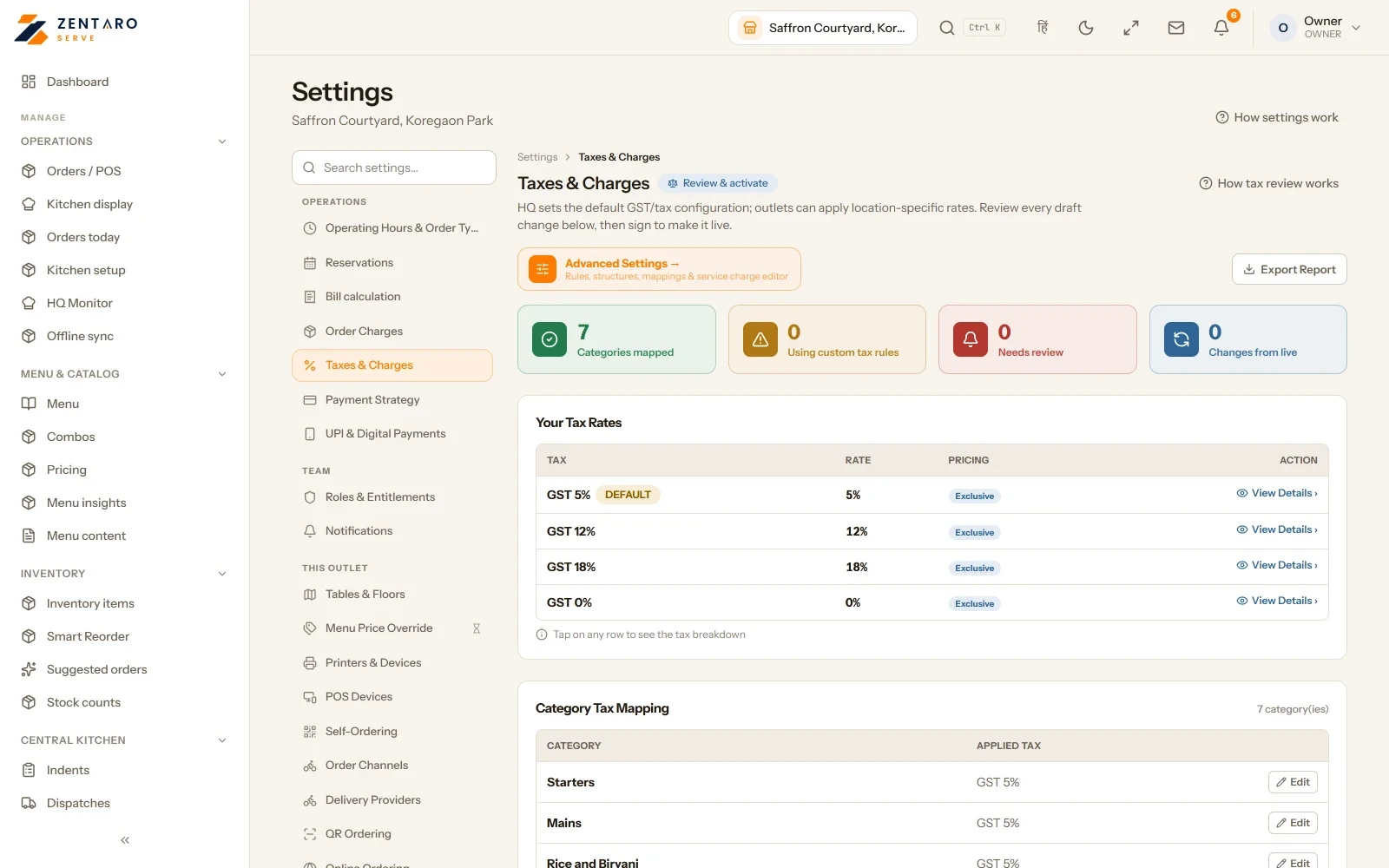
Tax setup
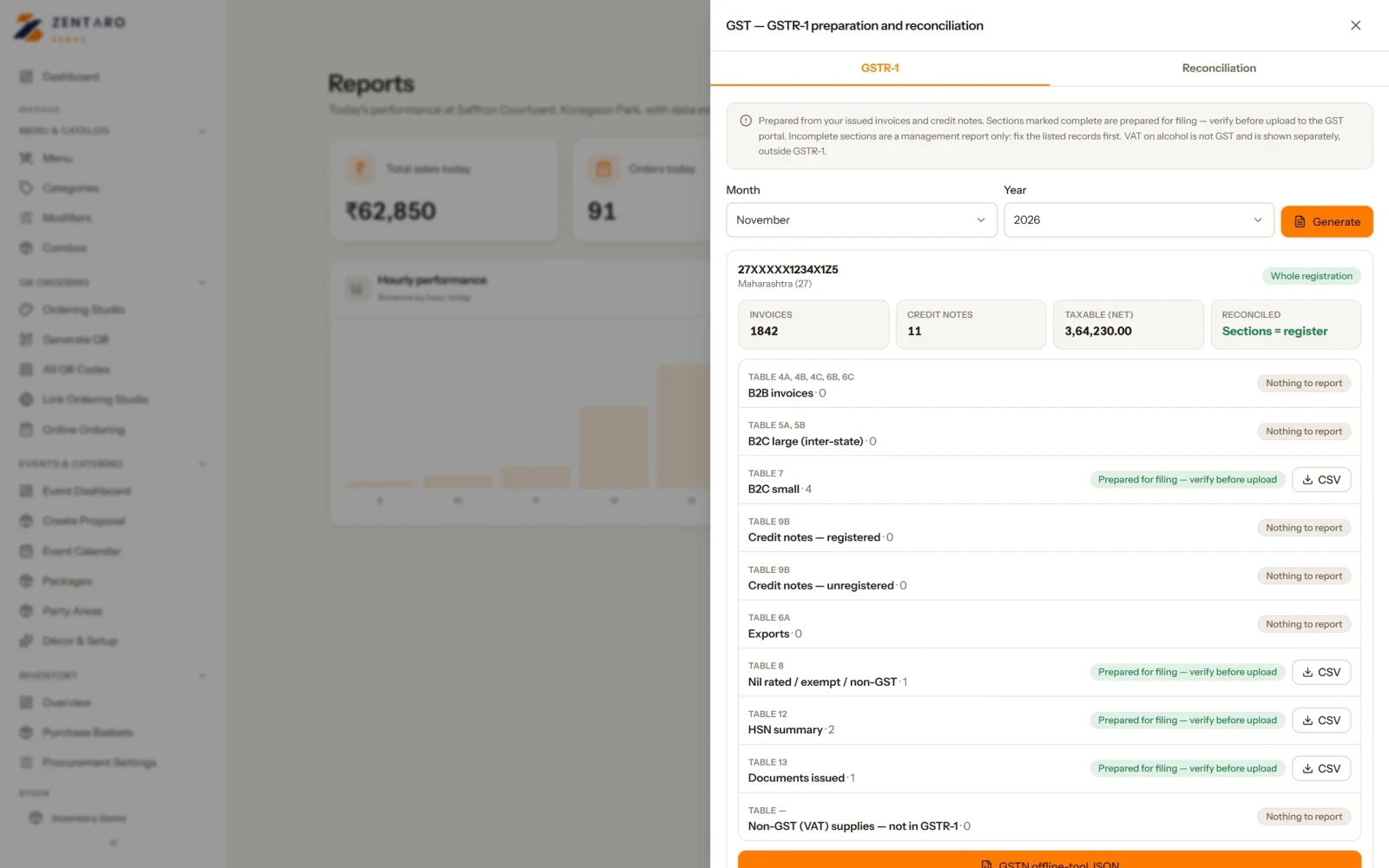
GSTR-1 for the month, ready to export
Example screens with sample data
The problem you know
Why restaurant GST goes wrong
Tax is set item by item, and mistakes show at filing time.
A new owner is not GST registered yet and does not want tax lines.
The accountant asks for a month of bills in a sheet.
How does a GST invoice for a restaurant get made?
Open Settings > Taxes. Say whether you are registered.
Add your registration. Group your items by tax rate.
Map each item to its tax group.
Bills print with the tax: CGST and SGST inside your state, or IGST between states. Rounding follows your rules, and an optional service line is added only when staff choose it.
Export for your accountant: the GSTR export.
What GST billing software for restaurants includes
GSTR-2B statement import with a reconciliation status for each line, and an ITC register.
Supplier-side e-invoice and e-way bill data is prepared for supplier invoices and stock transfers. You record the IRN and the e-way bill number you get from the portal. E-invoices for your own sales (IRN) are planned.
Tax by region or by location where the rules differ.
Versions and an audit of tax rules, so each change is on record.
A reprint keeps the GSTIN it was issued under.
Excise rates where they apply, and country packs for outlets outside India.
What it is not
Zentaro Serve prepares the data. Your accountant files the returns.
Zentaro Serve does not send to the government portal for you.
Invoice numbers follow the Rule 46(b) 16-character format and are unique for each terminal. They are not one global run with no gaps.
Talk to us and bring your current tax setup.Talk to us
GSTR-1, service charge and tax settings
GSTR-1 for the month
Pick a month. Your sales are grouped by the GSTR-1 tables.
Each section says if it is complete, incomplete or empty. An incomplete one names the bills and items to fix.
Download the complete sections as a file for the GSTN offline tool, or every section as a CSV.
It is prepared for filing. Check it before you upload. Only people with the export permission can open it.
Optional service charge
Make it available for a brand, a region or an outlet. The rate can be 0 to 30 percent.
Choose how it is taxed. It can share the food rate, use one flat rate, or be tax-free.
Keep it off on every bill, and add it only when the guest agrees. Under the CCPA guidelines a service charge cannot be added by default. Check the current position for your case.
Tax rounding
Choose how tax rounds: half up, half to even, always down or always up.
A change needs a second person to approve it. It starts on a date you pick.
Bills already issued never change. For GST, CGST and SGST always stay equal.
Tax changes go through a draft
A tax edit starts as a draft. Live billing does not change until you review it and switch it on.
While one person holds the draft, others are locked out.
A history panel lists the earlier versions.
One tax number per state
Add the tax number for each state you work in.
Each outlet bills under the number for its own state. Each number has dates, so an old bill reprints as it was issued.
The screen warns you when a state bills without a number.
Tax overrides, on record
A tax override at order time is written to a record. Both granted and refused attempts are kept.
Filter the record by outlet, dates, order or rule, and download it as a CSV.
Only people with the audit permission can open it.
Common questions.
Does Zentaro Serve work out CGST, SGST and IGST?
Yes. The tax is decided by the place of supply.
Can I export to my accountant?
Yes. You get a GSTR export for your accountant. Supplier bills can be sent to Zoho Books.
What if I am not registered for GST?
Turn GST off for your brand. The tax screens go away and bills print clean.
What is a GST invoice for a restaurant?
It is the bill your guest receives. It is a GST-ready invoice with the tax split shown. Zentaro Serve builds it from the GST setup you enter, so every bill uses the same rates and rounding. Check your setup with your accountant.
How do I set up GST in restaurant billing software?
Open Settings > Taxes. Enter your registration, group your items by tax rate and map each item. After that every bill uses the rates you set. You set the tax rates for your case, so check them with your accountant.
Can I run a restaurant without GST registration?
Yes. Turn GST off for your brand. The tax screens go away and bills print clean. Switch it on when you register.
Who files GST returns, me or the software?
Your accountant files. Zentaro Serve prepares the data, with a GSTR export.
Can different outlets have different tax rules?
Yes. Tax rules can be set by region or by location. Each change is kept on record.