
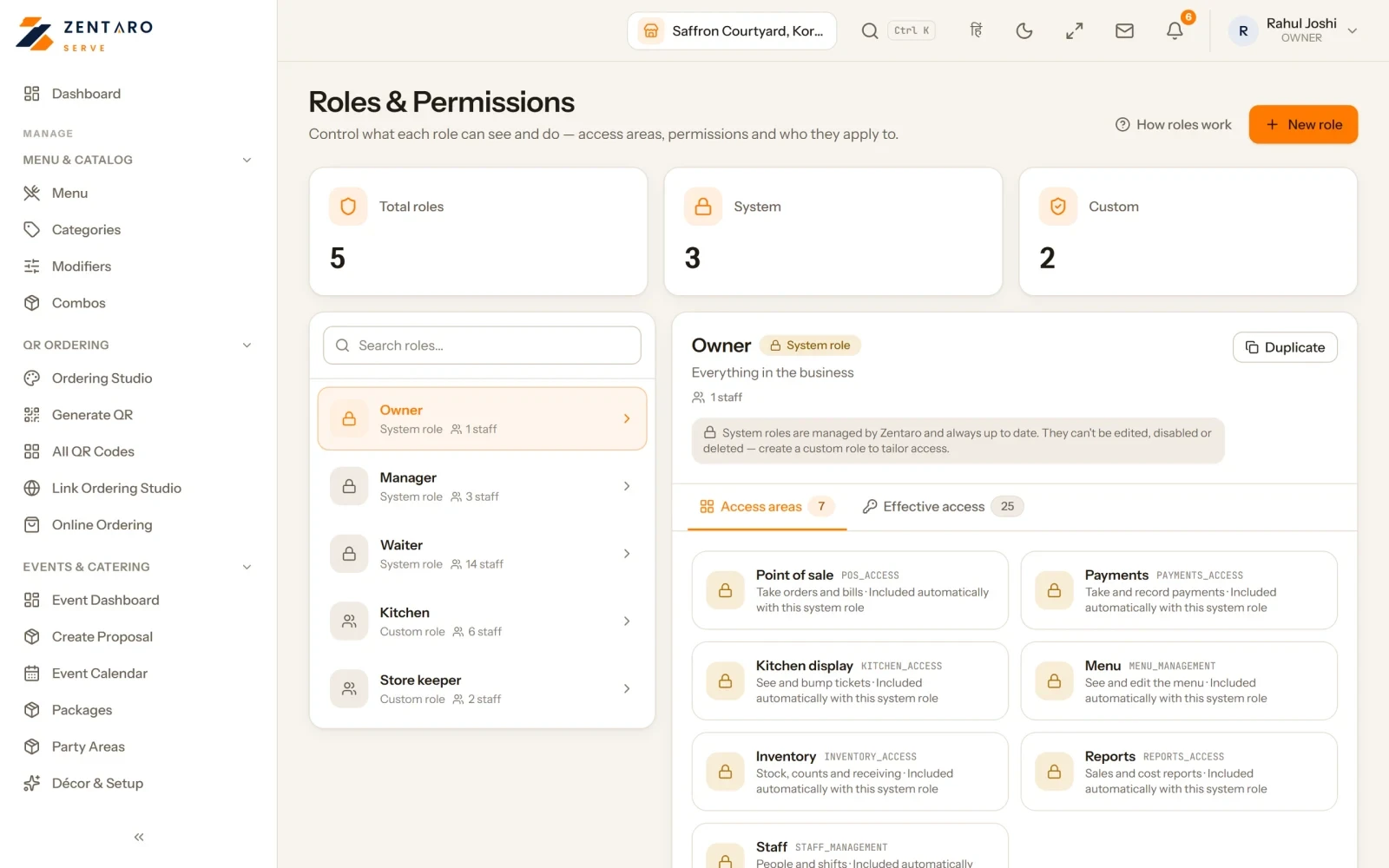
The rule behind every table
Least access. A person gets the smallest set of actions that lets them do the job. It protects honest staff, because they cannot be blamed for something they could not have done. It also protects you, because a mistake or a misuse stays small.
The usual roles
| Role | Main job |
|---|---|
| Owner | Sets up the business, sees everything, changes prices, users and settings |
| Manager | Runs the shift, approves exceptions, sees reports for their outlet |
| Cashier | Takes payment, closes bills, counts the drawer |
| Waiter or captain | Takes orders, sends them to the kitchen, serves the table |
| Kitchen | Sees tickets, marks dishes ready |
A captain is the staff member who takes orders and looks after a section of tables. A waiter often does the same job with less of the section duty. Treat them as one role unless your restaurant needs a difference.
Example: a four-role permission table
This is an example, with made-up limits. Adjust the limits to your own business.
| Action | Waiter | Cashier | Manager | Owner |
|---|---|---|---|---|
| Take an order and send it to the kitchen | Yes | Yes | Yes | Yes |
| Add items to an open table | Yes | Yes | Yes | Yes |
| Void an item before it is sent | Yes | Yes | Yes | Yes |
| Void an item after it is sent | No | No | Yes, with a reason | Yes |
| Give a discount | No | Up to 5 percent | Up to 15 percent | Any |
| Take payment and close a bill | No | Yes | Yes | Yes |
| Refund a closed bill | No | No | Yes, with a reason | Yes |
| Reprint a bill | No | Yes, marked duplicate | Yes | Yes |
| Change menu prices | No | No | No | Yes |
| See the day-end report | No | Own drawer only | Own outlet | All outlets |
| Add or remove a user | No | No | No | Yes |
Notice two things. First, a void before the order is sent costs nothing, so everyone may do it. A void after the kitchen has the order wastes food, so it needs a manager. Second, the discount cap grows by role. A cashier can give a small thank-you. A larger one needs someone higher.
Void rights
Void rights are the most abused permission. Keep these rules:
- A void after the kitchen has the order needs a manager and a reason.
- Nobody approves their own void or discount. If the manager is the one giving it, the owner reviews it later.
- Every void is logged with a name, a time and a reason.
Read more in void and cancel control.
Shift scheduling
Who builds the schedule and who can change it? Usually the manager builds it and the owner sees it. Staff should see their own shifts. Only a manager should edit them. This matters for money too, because staff costs are one of your two biggest costs.
Kitchen access
The kitchen needs to see tickets and mark dishes ready. It does not need prices, payments or reports. Keep the kitchen's view simple. A cook with fewer screens makes fewer mistakes.
When someone joins or leaves
- Give a new person their own login on day one. Never share a login.
- Start with the lowest role that fits. Raise it later.
- When someone leaves, remove access the same day, not at month end.
- When someone moves up, change the role and tell them the new rules.
Check every quarter
List every user and role. Remove anyone who left. Ask whether each role still fits the person. Look at the void and discount log by role for anything odd.
Our guide on theft and pilferage shows how roles fit into a wider set of checks.
Common questions
Which role should be able to void an item?
Anyone may void before the order is sent. After the kitchen has it, a manager should approve it with a reason.
How big should a discount cap be?
It depends on your business. Many restaurants give each role a cap, with a small one for cashiers and a bigger one for managers.
Should staff share one login?
No. With a shared login you cannot tell who did what.
What can a kitchen role see?
Tickets and the ready button. It does not need prices, payments or reports.
When should I remove a leaver's access?
The same day they leave.
Where Zentaro Serve fits
In Zentaro Serve, discounts stay inside the limit set for each role, and a void or a refund can need a second person to approve it.
See how access is controlled